

AI Deployments
AI Deployments are the "brains" of your assistants. This section allows you to configure which language models power your assistants and fine-tune their behavior.
We support two types of deployments:
- LLM Deployment For text-based chat assistants using standard chat completion APIs
- Voice Deployment For voice assistants requiring low-latency, streaming audio interactions
💡 Which one do I need?
Building a Text Assistant? → Create an LLM Deployment
Building a Voice Assistant? → Create a Voice Deployment
LLM Deployment
Large Language Model (LLM)
What's the Role of the Language Model in a Gen AI?
The language model serves as the pivotal component in a Generative AI system. It is responsible for generating answers to user queries, essentially acting as the "brain" of the operation.
What LLM Can I Choose From?
We currently offer a selection of language models to best suit your needs:
-
OpenAI:
gpt-5: The most advanced and powerful model, for tasks requiring maximum capability.gpt-5-chat: Optimized for conversational flow and dialogue.gpt-5-mini: A smaller, faster version balanced for general-purpose tasks.gpt-5-nano: The most lightweight and efficient version, ideal for simple, high-speed applications.gpt-4.5-preview: Provides early access to the next generation of models with the latest features.gpt-4.1: A highly capable model for complex reasoning and in-depth analysis.gpt-4o: The flagship multimodal model, optimized for a superior balance of speed, intelligence, and cost.gpt-4o-mini: A more streamlined and economical version of GPT-4o.- ... and more, as new models are frequently added upon their release.
-
Microsoft Azure OpenAI:
- Benefit from the full power of OpenAI's models, hosted on Azure's secure and scalable infrastructure. The list of available models is the same as for OpenAI, including the gpt-5, gpt-4.1, and gpt-4o families.
-
Anthropic:
claude-4-sonnet-latest: A newer generation model with enhanced capabilities.claude-3-5-sonnet-20240620: A powerful and very fast model, excellent for a wide range of tasks.claude-3-opus-latest: The most powerful model in the Claude 3 family for highly complex tasks.claude-3-sonnet-latest: An ideal balance of intelligence and speed for enterprise workloads.claude-3-haiku-latest: The fastest and most compact model for near-instant responsiveness.
-
Mistral:
mistral-large-latest: Mistral's flagship model with top-tier reasoning capabilities.codestral-latest: A specialized model openly-weighted for code generation tasks.mistral-small-latest: A fast and cost-effective model for high-volume tasks.pixtral-large-latest: An innovative model designed for specific advanced use cases.
-
Google Vertex AI:
gemini-2-flash: The next generation of Google's fast and efficient models.gemini-1.5-pro: A highly capable multimodal model with a very large context window.gemini-1.5-flash: A lighter, faster, and more cost-efficient version of Gemini 1.5 Pro.gemma-3-9b-it: The latest generation of Google's open, instruction-tuned models.codegemma: A specialized model for code generation and software development tasks.
-
Deepseek:
deepseek-chat: A powerful model designed for general conversational use.deepseek-reasoner: A specialized model optimized for complex logical reasoning and problem-solving.
-
LLMProxy / Lite LLM:
- These providers offer a flexible gateway to use a vast range of other models by specifying their direct path (e.g., openai/gpt-4o-mini).
We are continuously expanding our offerings, so stay tuned for more options.
How to Configure Your LLM Deployment?
Setting up your AI model is a straightforward process. The configuration is divided into two parts: general settings that are common to all models, and specific parameters that change depending on the model you select.
General Settings
These fields are the foundation of your AI deployment:
- Model name: A custom name you give to this specific deployment for easy identification.
- Provider: The company providing the language model (e.g., OpenAI, Google, Anthropic).
- Text embeddings: The model used to convert text into numerical representations for semantic understanding.
- Base model: The specific language model you want to use (e.g., gpt-4o, gpt-5).
- API token: Your secret API key from the provider to authorize the requests.
Model-Specific Parameters
The parameters to fine-tune the model's behavior will appear once you have selected a "Base model". There are two main configuration types:
1. Standard Configuration (for models like GPT-4o)
This configuration uses "Temperature" to control the creativity of the model. It is typically found on previous-generation models.
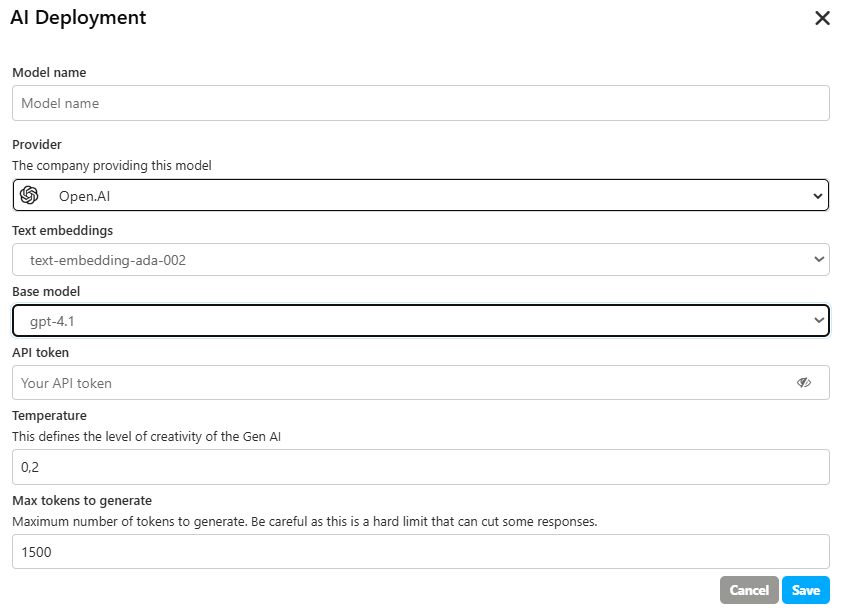
- Temperature: Defines the level of creativity of the AI. A lower value (e.g., 0.2) makes the output more focused and deterministic, while a higher value increases its creativity and randomness.
- Max tokens to generate: Sets a hard limit on the number of tokens the model will generate in a single response. Be careful, as this can cut off longer answers.
2. Advanced Configuration (for models like GPT-5)
This modern configuration provides more intuitive controls over the model's thought process and the detail of its response.
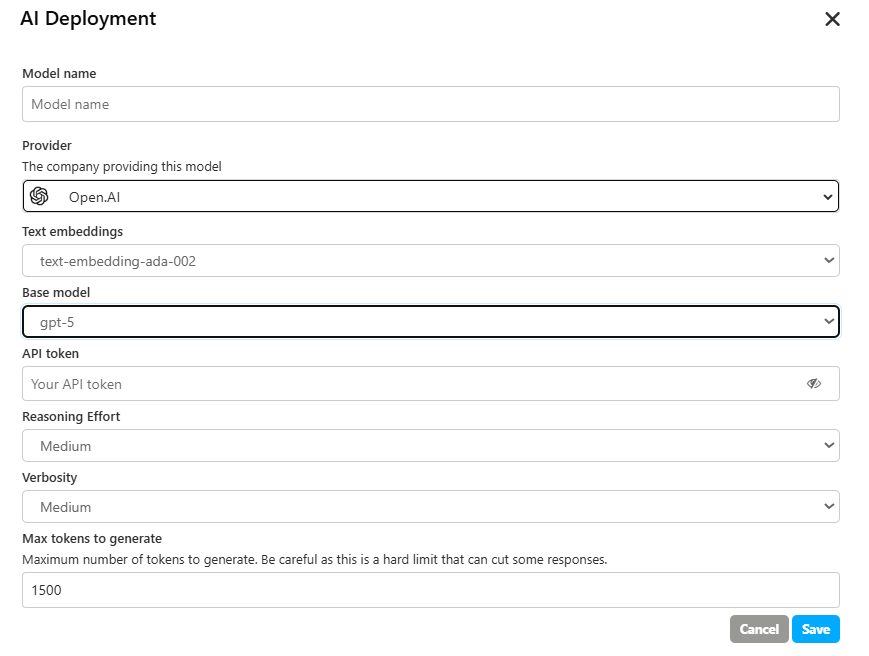
Reasoning Effort
This parameter influences how deeply the model thinks before answering. A higher effort can lead to more accurate and well-structured responses but may slightly increase the response time. The available options are:
- Minimal: For the fastest possible answers with surface-level reasoning.
- Low: For basic reasoning, suitable for simple and direct questions.
- Medium: A good balance between the depth of thought and the speed of response. Ideal for most use cases.
- High: For in-depth analysis and complex thinking, perfect for challenging problems that require a thorough breakdown.
Verbosity
This controls the length and level of detail of the answer. It allows you to choose between a very brief response and a complete explanation. The available options are:
- Minimal: Provides the shortest and most direct answer possible.
- Low: Generates a concise response that gets straight to the point.
- Medium: Offers a response with a balanced level of detail, providing context without being overly long.
- High: Produces a complete and detailed explanation, covering all aspects of the query.
Max tokens to generate
This parameter functions the same way, setting a hard limit on the length of the response.
Voice Deployment
Voice Deployments are specifically designed for Voice Assistants, enabling low-latency, streaming voice interactions with natural conversation flow.
⚠️ Important:
Realtime Voice Deployments are required for Voice Assistants. Standard LLM Deployments use chat completion APIs that do not support the low-latency streaming required for natural voice conversations.
What is a Voice Deployment?
Voice Deployments use specialized APIs (OpenAI's Realtime API, Google's Live API) that process and generate voice responses with minimal delay. Unlike standard LLM Deployments, Realtime Voice Deployments:
- Stream responses as they're generated (no waiting for complete answers)
- Process audio input directly without text conversion delays
- Generate natural voice output with proper intonation and timing
- Handle interruptions allowing users to interrupt the assistant mid-response
Supported Providers
We currently support the following providers for Realtime Voice Deployments:
Google Vertex AI Gemini models with Live API for native audio support
gemini-live-2.5-flash-native-audio(Dec 2025)gemini-2.5-flash-native-audio-preview-12-2025gemini-live-2.5-flash-preview-native-audio-09-2025
OpenAI GPT models with Realtime API
gpt-realtime(Aug 2025)gpt-4o-realtime-previewgpt-4o-mini-realtime-preview
Azure OpenAI Coming soon
Creating a Realtime Voice Deployment
To create a new Realtime Voice Deployment:
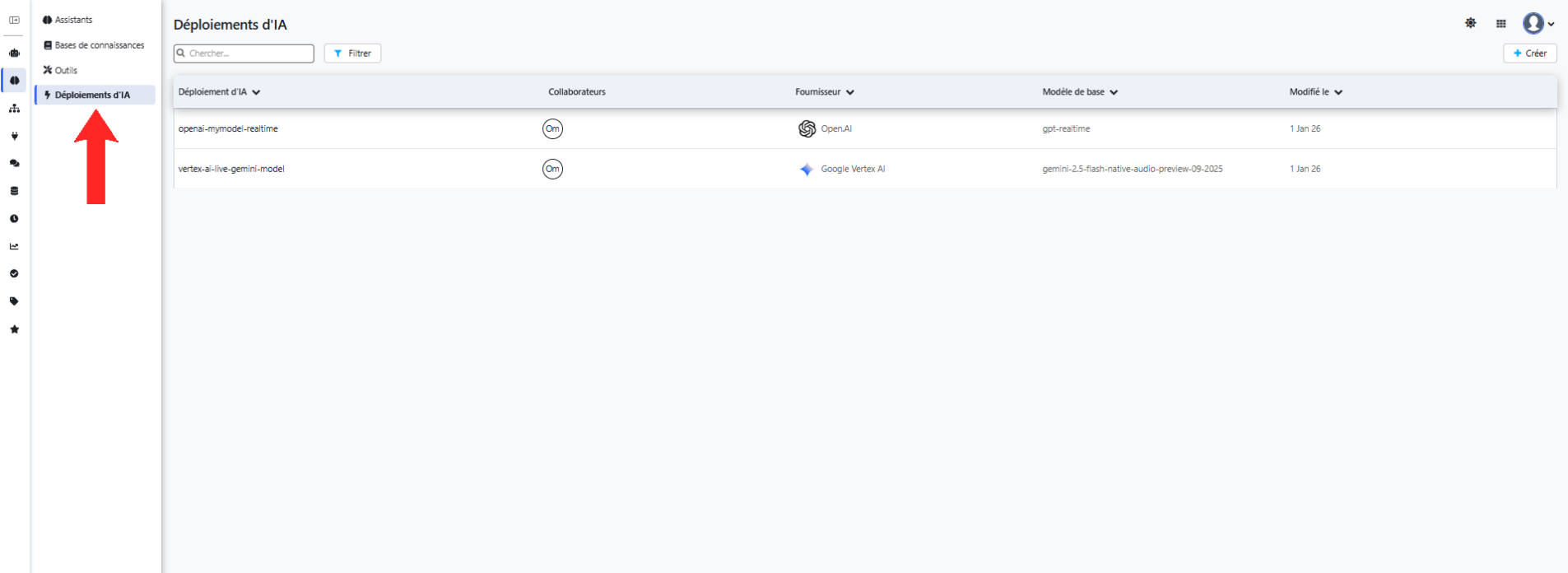
- Navigate to AI Deployments in the left sidebar
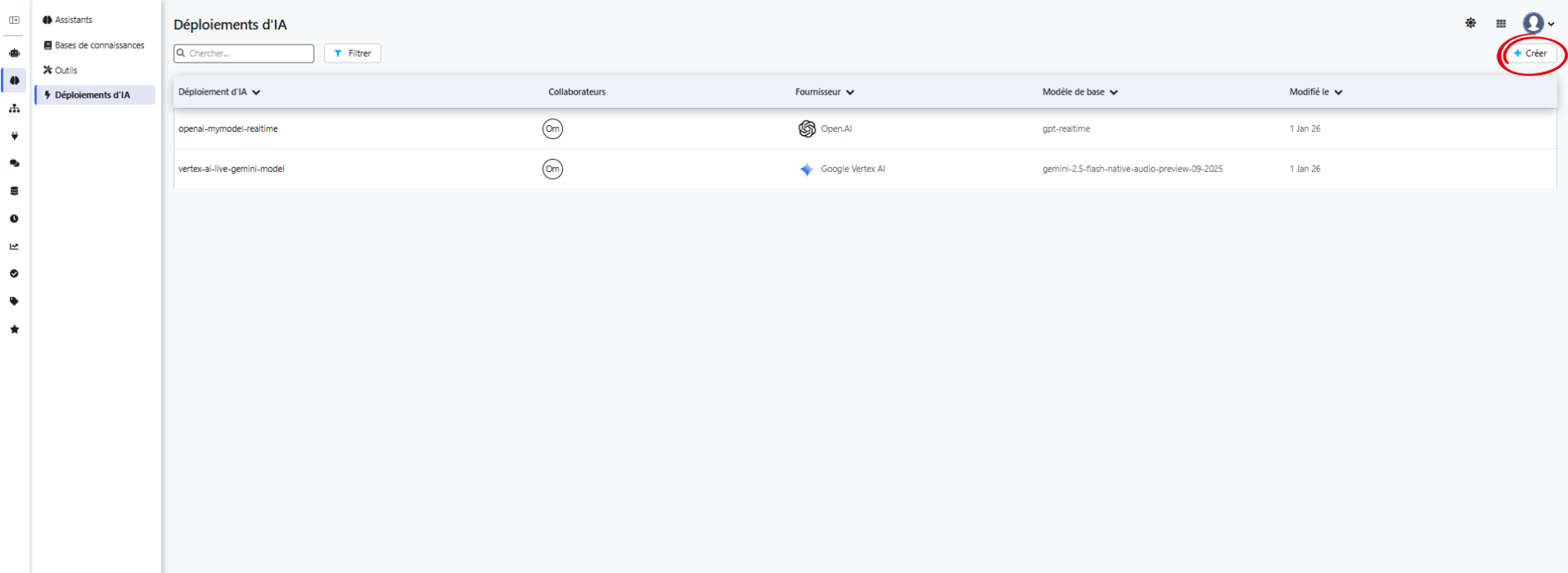
- Click the "+ Create" button
- Fill in the deployment configuration based on your chosen provider (see below)
Google Vertex AI Configuration
Google Vertex AI offers Gemini models with native audio processing capabilities, ideal for voice assistants.
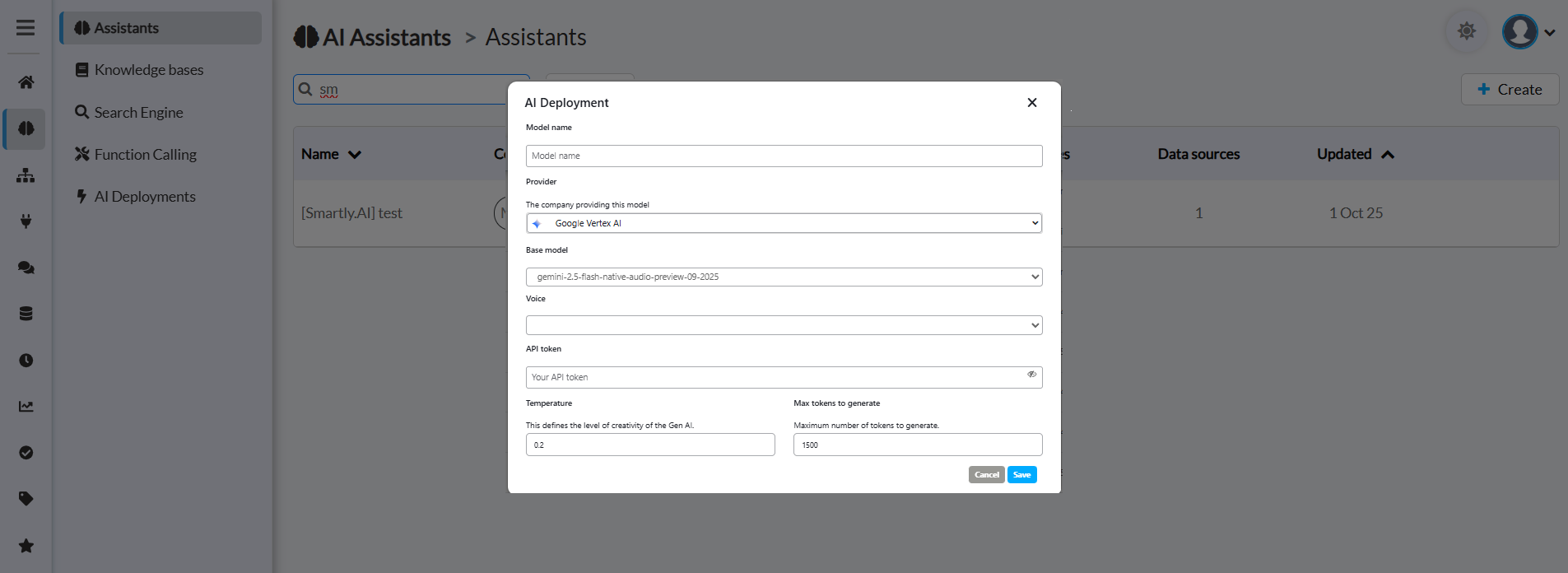
Configuration Fields
Model name
- Give your deployment a clear, descriptive name
- Example: "Voice Assistant - Gemini Audio"
- This name will appear in the deployment selector when configuring assistants
Provider
- Select "Google Vertex AI" from the dropdown
- This determines which AI provider will power your assistant
Base model
- Select the Gemini native audio model for Live API
- Recommended:
gemini-live-2.5-flash-native-audio(Latest, December 2025) - For Gemini Developer API:
gemini-2.5-flash-native-audio-preview-12-2025 - Older preview:
gemini-live-2.5-flash-preview-native-audio-09-2025 - These models process raw audio natively through a single, low-latency model with 30 HD voices in 24 languages
Voice
- Select the voice profile for your assistant's responses
- Gemini Live API offers 30 HD voices in 24 languages
- Available voices: Puck (default), Charon, Kore, Fenrir, Leda, Orus, Aoede, Zephyr, Callirhoe, Autonoe, Enceladus, Iapetus, Umbriel, Algieba, Despina, Erinome, Algenib, Rasalgethi, Laomedeia, Achernar, Alnilam, Schedar, Gacrux, Pulcherrima, Achird, Zubenelgenubi, Vindemiatrix, Sadachbia, Sadaltager
- Voice characteristics:
- Puck (default): Conversational, friendly
- Charon: Deep, authoritative
- Kore: Neutral, professional
- Fenrir: Warm, approachable
- Preview voices in AI Studio before selecting
API token
- Your Google Cloud API key for Vertex AI
- Keep this secure it provides access to your Google Cloud resources
- Format: Obtain from Google Cloud Console under API credentials
Temperature
- Controls the creativity/randomness of responses
- Range: 0.0 to 2.0
- Lower values (0.0-0.5): More focused, deterministic, and consistent responses
- Higher values (0.5-1.0): More creative and varied responses
- Recommended for voice assistants: 0.2 - 0.4 (balanced and reliable)
Max tokens to generate
- Maximum number of tokens (words/pieces) in each response
- Higher values allow longer responses but increase latency
- Recommended: 1500 tokens (approximately 1-2 minutes of speech)
- Adjust based on your use case:
- Short answers: 500-800 tokens
- Detailed explanations: 1500-2000 tokens
OpenAI Configuration
OpenAI's GPT realtime models provide state-of-the-art voice interaction capabilities with advanced reasoning.
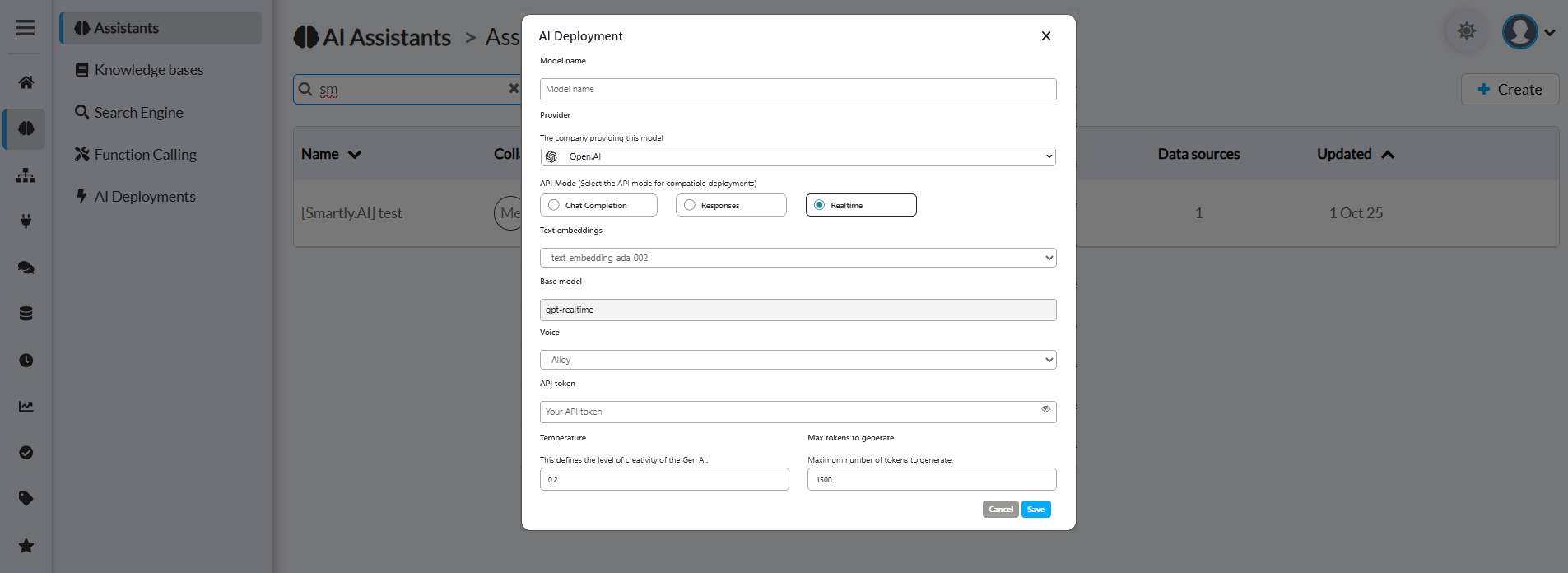
Configuration Fields
Model name
- Give your deployment a descriptive name
- Example: "Voice Assistant - GPT Realtime"
- Used to identify this deployment across your platform
Provider
- Select "OpenAI" from the dropdown
- Connects to OpenAI's API infrastructure
API Mode
- Critical: Select "Realtime" for voice assistants
- Available options:
- Chat Completion: Standard text-based interactions (for LLM Deployments)
- Responses: Structured response format (for LLM Deployments)
- Realtime: ✅ Required for Realtime Voice Deployments
⚠️ Important:
You must select "Realtime" as the API Mode for OpenAI voice deployments. This activates OpenAI's Realtime API for voice interactions. Other modes (Chat Completion, Responses) are for LLM Deployments only.
Text embeddings
- Select the embedding model for text processing
- Recommended:
text-embedding-ads-002ortext-embedding-3-small - Used for knowledge base searches and semantic understanding
- Higher quality embeddings improve context retrieval
Base model
- Enter the OpenAI model identifier for Realtime API
- Recommended:
gpt-realtime(Latest, generally available most advanced) - Alternatives:
gpt-4o-realtime-preview,gpt-4o-mini-realtime-preview(cost-effective) - The
gpt-realtimemodel offers 30.5% accuracy on instruction following vs 20.6% for previous models
Voice
- Select the voice profile for responses
- OpenAI Realtime API offers 13 voices with the most advanced speech quality
- Available voices: Alloy, Ash, Ballad, Coral, Echo, Fable, Onyx, Nova, Sage, Shimmer, Verse, Marin, Cedar
- Recommended: Use Marin or Cedar for best quality (newest voices with most natural-sounding speech)
- Voice characteristics:
- Marin: Premium quality, natural pacing and intonation (NEW)
- Cedar: Premium quality, expressive and empathetic (NEW)
- Alloy: Neutral, professional
- Echo: Warm, conversational
- Fable: Clear, articulate
- Onyx: Deep, authoritative
- Nova: Energetic, friendly
- Shimmer: Soft, calm
- Verse: Balanced, versatile
- Ballad: Smooth, storytelling
- Coral: Bright, upbeat
- Sage: Mature, wise
- Ash: Calm, steady
API token
- Your OpenAI API key
- Keep secure provides access to your OpenAI account
Temperature
- Controls response randomness and creativity
- Range: 0.0 to 2.0
- 0.0-0.3: Very focused, deterministic (customer support)
- 0.3-0.7: Balanced creativity (general assistance)
- 0.7-1.0: More creative and varied (conversational AI)
- Recommended: 0.2 for consistent, reliable responses
Max tokens to generate
- Maximum response length in tokens
- Recommended: 1500 tokens
- Balance between:
- Response completeness: Higher = more detailed
- Response latency: Lower = faster replies
- Adjust based on your assistant's purpose
Best Practices
Configuration Tips
- Start with recommended settings: Temperature 0.2, Max tokens 1500
- Test different voices: Preview each voice to match your brand tone
- Monitor latency: Lower max tokens if responses are too slow
- Secure your API keys: Never expose tokens in client-side code
- Set up billing alerts: Monitor API usage to avoid unexpected costs
Troubleshooting
Common Issues
"Deployment not available" error
- Verify your API token is valid and has sufficient credits
- Check that the base model name is correct
- Ensure your API key has access to voice models (Live API for Vertex AI, Realtime API for OpenAI)
High latency in responses
- Reduce max tokens to generate
- Choose a faster base model (e.g., flash variants)
- Check your internet connection and server location
Poor audio quality
- Verify the voice selection is appropriate
- Check input audio quality and microphone settings
- Ensure sufficient API rate limits
Unexpected responses
- Adjust temperature (lower for more consistency)
- Review main instructions in assistant configuration
- Check knowledge base connections
Sources
Model information and specifications referenced from:
Google Vertex AI:
- Gemini Live API available on Vertex AI
- Gemini 2.5 Flash with Gemini Live API Documentation
- How to use Gemini Live API Native Audio in Vertex AI
- Improved Gemini audio models for powerful voice interactions
- Live API capabilities guide
OpenAI:
Updated 7 months ago